How do I bring people to my Kollekt?
People find you on social media, on streaming and at your shows. Your Kollekt is where they come together, so every channel you already use can lead there with one link. Joining is free, on the web, and nobody needs the app.
Get your link
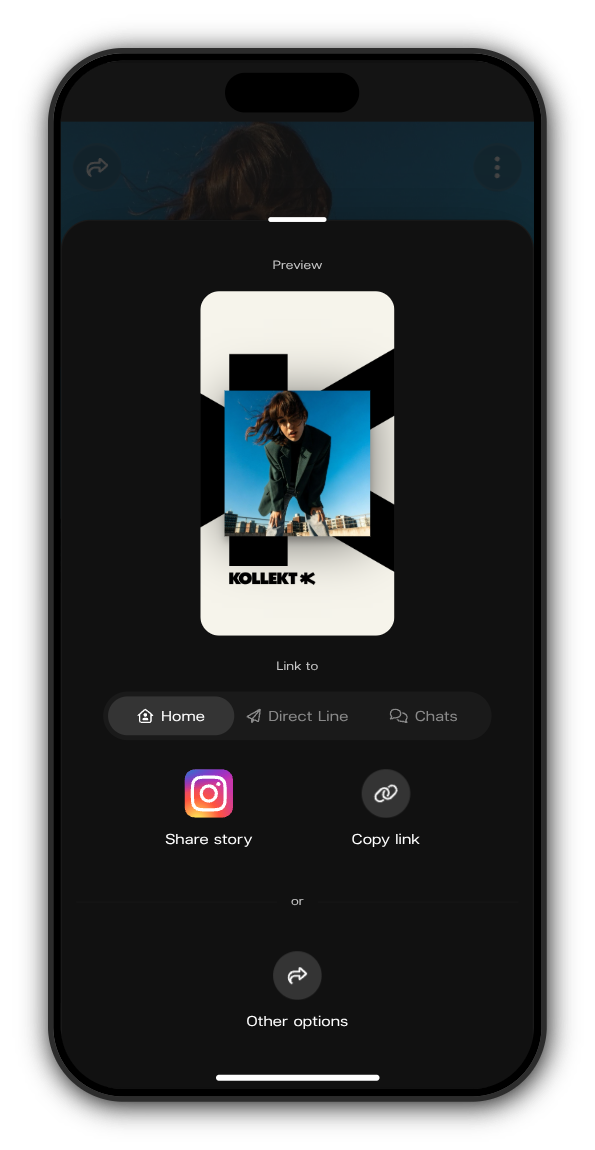
1. Open your Kollekt and tap Share
On your Home, tap the share icon at the top left.
2. Choose where the link goes
Under Link to, pick Home, Direct Line or Chats. The link opens your Kollekt on that screen.
3. Share it
Tap Copy link, or Other options to send it straight to another app. In the Kollekt app you can also tap Share story: Instagram opens with a story of your picture, ready to post.
Where to put it
- Your bio. Put the link in your Instagram, TikTok and other bios. It's the simplest start, and it works whether you post a lot or a little.
- Stories and posts. Share your Direct Line link when there's something new on it, like a voice note or a presale link for subscribers.
- At your shows. Put your link on the screen or say it from the stage. People join on their phone: they slide to join and confirm with the link we email them.
Members bring people too
When a member shares your Kollekt from your Home, they share their own link. Someone they bring in counts as their referral once that person gets a subscription or a drop for the first time. Referrals count on your leaderboard.
Updated on: 19/10/2026
Thank you!