How do I connect my ad pixel?
If you run ads on Meta, Google or TikTok, you can connect your pixel to your Kollekt. Your ad platform then sees who visits, who opens the subscribe screen and who pays, so you can measure your ads and find more people like them.
Connect your pixel
1. Open Tracking Pixels
In your browser, go to app.kollekt.io/your-link/admin, using the link of your Kollekt, and tap Tracking pixels.
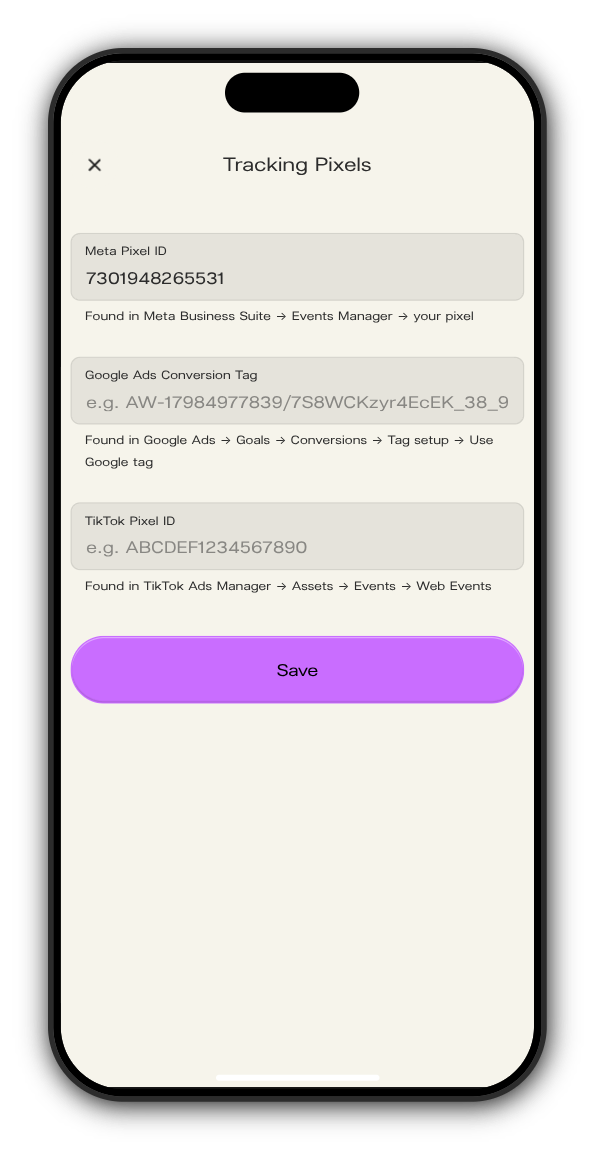
2. Paste your IDs
Fill in the ones you use. Each field says where to find the ID:
- Meta Pixel ID: Meta Business Suite → Events Manager → your pixel
- Google Ads Conversion Tag: Google Ads → Goals → Conversions → Tag setup → Use Google tag
- TikTok Pixel ID: TikTok Ads Manager → Assets → Events → Web Events
3. Tap Save
Your pixels load on every screen of your Kollekt from now on. To disconnect one, empty its field and tap Save.
What your pixel sees
When a person… | Meta and TikTok event | Google event |
|---|---|---|
Opens your Kollekt | PageView | page view |
Opens a drop | ViewContent | view_item |
Opens the subscribe or purchase screen | AddToCart | add_to_cart |
Continues to the payment page | InitiateCheckout | begin_checkout |
Completes a payment | Purchase (TikTok: CompletePayment) | purchase |
Joining your Kollekt and getting a free drop also count as a purchase, with the value 0. With a Google tag that includes a conversion label (the part after the /), each purchase is also sent as a Google Ads conversion.
Updated on: 19/10/2026
Thank you!