How do I edit my Kollekt's name, bio, links and cover?
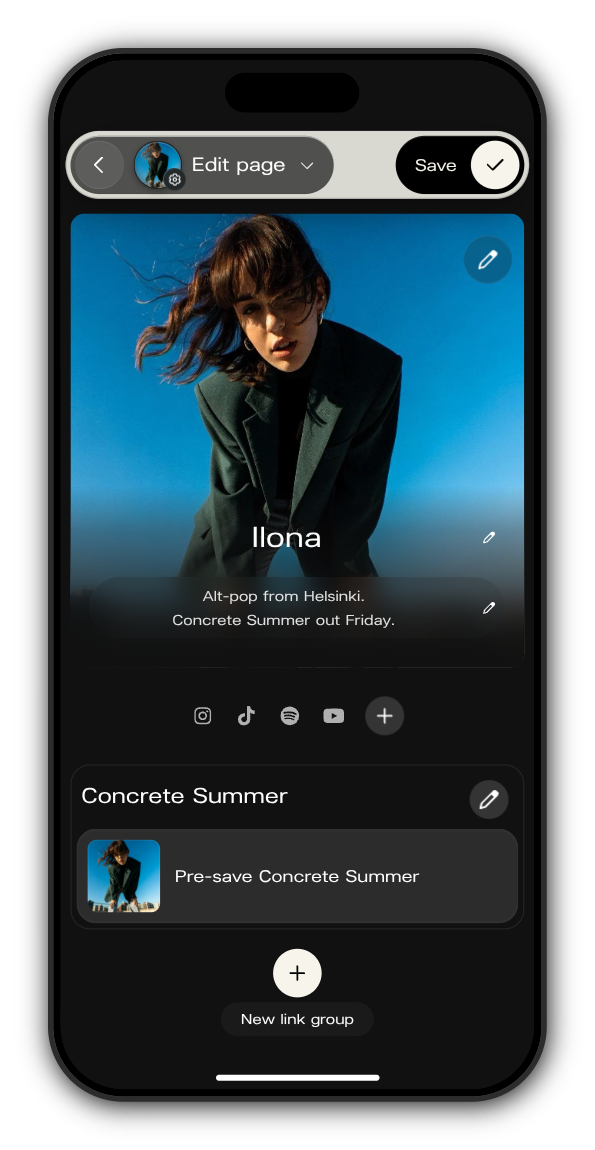
Everything people see on your Kollekt's Home, from your name to your links, is changed on one screen: Edit page.
Open Edit page
Tap your picture with the gear at the end of the tab bar and choose Edit artist page. You can also tap your bio on your Kollekt's Home to go straight to it.
Make your changes
1. Change the cover
Tap the pen at the top right of the cover and choose an image. The cover has to be an image file.
2. Edit your name and bio
Tap your name or your bio and type. Each fits up to 80 characters, so keep the bio to one line about you or what's coming.
3. Add your socials
Tap + under the cover, then + next to each platform and paste the link to your profile there. You can add Instagram, TikTok, YouTube, Spotify, Apple Music, Facebook, X (listed as Twitter), Twitch, Discord and SoundCloud. Tap the check mark when you're done.
4. Add links
Tap New link group at the bottom. Give the group a title and, if you like, a description, then tap Add link for each link: a title, the URL and an image. The arrows move groups and links up or down, and the bin removes them.
5. Save
Tap Save at the top right. Your Kollekt opens with the changes in place.
Updated on: 19/10/2026
Thank you!