How do I give a member free months?
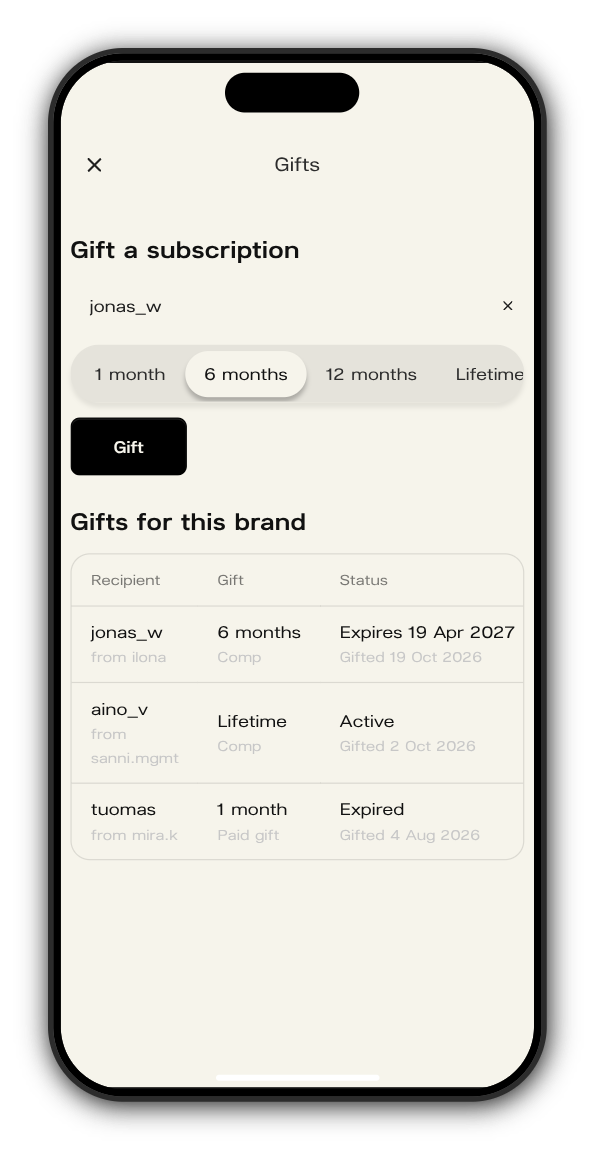
You can give anyone a subscription to your Kollekt for free: for 1, 6 or 12 months, or for life. They become a subscriber straight away, with everything subscribers get.
Give free months
1. Open Gifts in your admin
Go to app.kollekt.io/yourname/admin and tap Gifts.
2. Find the person
Under Gift a subscription, search for their username. If they aren't on Kollekt yet, type their email instead: the subscription is theirs when they sign in with that email.
3. Choose how long
Pick 1 month, 6 months, 12 months or Lifetime.
4. Tap Gift
The gift shows in the list below with when it was given and when it ends.
Keep track of gifts
The list shows every gift in your Kollekt: who got it and from whom, how long it is, and its status: Active, Expires with a date, Expired or Revoked. Comp marks gifts from your team; Paid gift marks ones a member bought for someone.
Take a gift back
Tap Revoke on the gift (on a phone, scroll the list sideways to reach it) and confirm with Revoke gift. Only that gift's time is taken back: any time the member paid for themselves stays.
Updated on: 19/10/2026
Thank you!