How do I price a drop?
A drop's price lives in its product. You set a suggested price and a minimum: members can pay the minimum or choose to pay more. Set both to 0 and the drop is free.
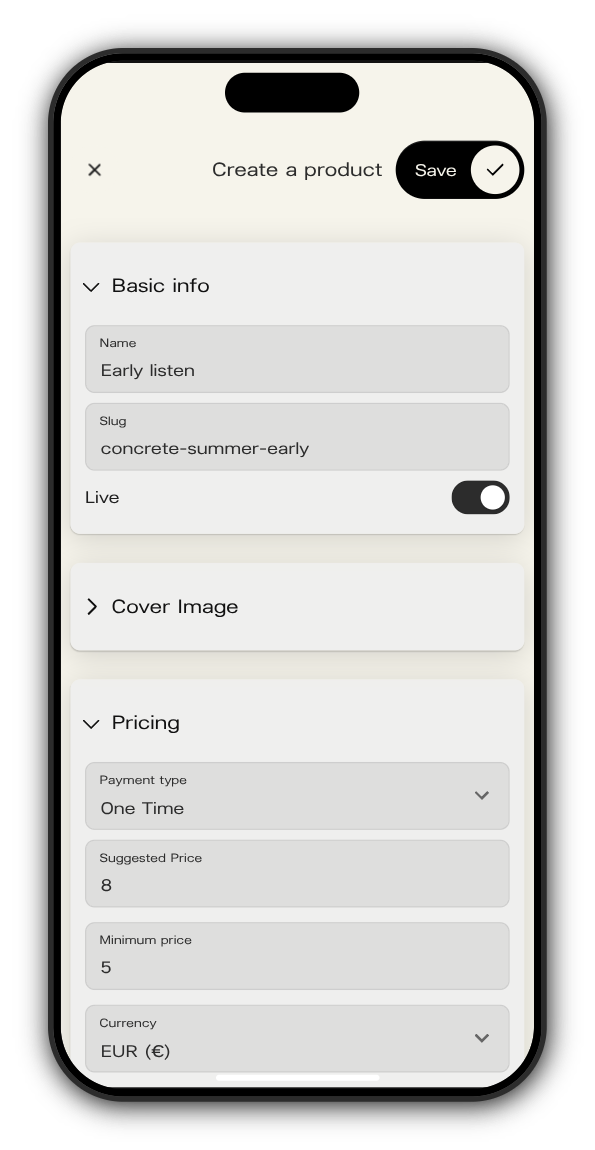
Set the price
1. Create a product
In your admin, open Drops and tap the + next to Product. To change a price later, select the product and tap the pencil.
2. Name it and switch Live on
Give it a Name and a Slug. Members can only buy a product that's Live.
3. Fill in Pricing
Keep Payment type on One Time for a drop. Then set:
- Suggested Price: the amount members see first.
- Minimum price: the least anyone can pay.
- Currency: EUR, USD or GBP.
4. Tap Save
Then open the drop, pick this product under Product and save the drop.
What members see
When a member buys, they see Minimum price with your minimum and the line "Pay the minimum price or choose to pay more." The amount starts at your suggested price, and they can lower it to the minimum or raise it.
What you earn
Kollekt's commission is 20 % of what members pay, counted after VAT and payment fees (and Apple's fee in the iPhone app). Sales through your own ticket or merch links have no commission. In the iPhone app, the price members see includes Apple's App Store fee.
Updated on: 19/10/2026
Thank you!