How do I read the Direct Line?
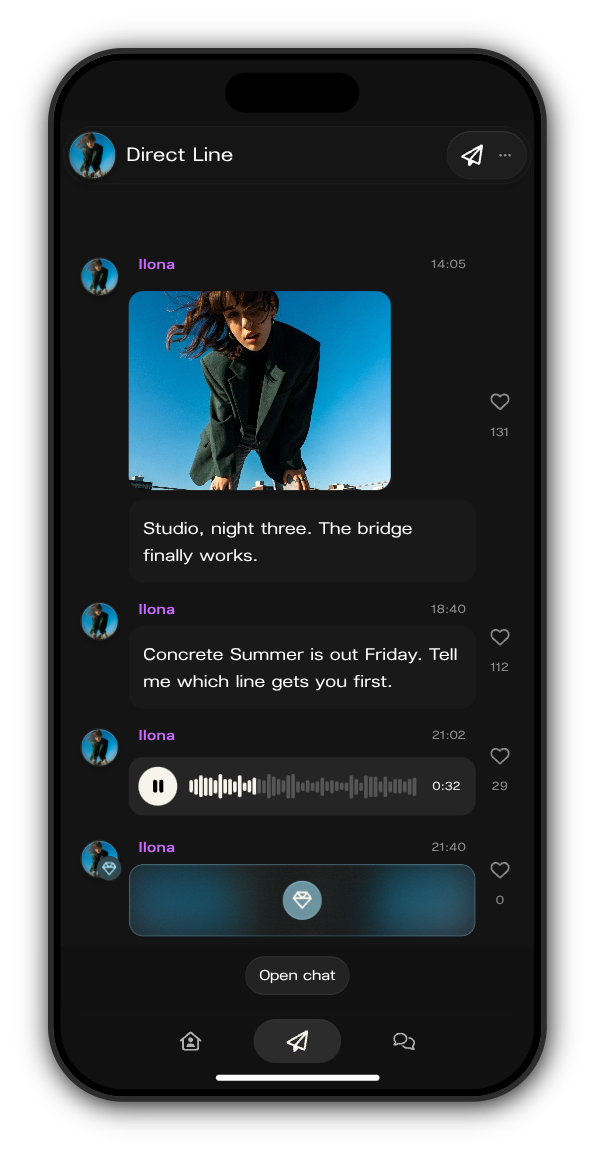
The Direct Line is where the artist posts to everyone who joined. Tap Direct Line (the paper plane) in the tab bar to read it. The newest post is at the bottom.
What you can do
1. Play a voice note
Tap play on a voice note. Scroll on and it keeps playing: a small player under the header lets you pause, jump back to the note or stop it.
2. Heart a post
Tap the heart next to a post. Tap it again to take the heart back.
3. Open photos and videos
Tap a photo or a video to see it full screen.
Posts kept for subscribers
A post with a blue gem on the artist's picture is kept for subscribers. Members see a blurred card with a gem instead of the post. Tap the gem to see what subscribing gets you.
Some posts are for a group
The artist can send a post to a group of members, for example by country or by when they joined. Only that group sees it, so the Direct Line can look a little different from a friend's.
Updated on: 19/10/2026
Thank you!